Components of ODU_ISC3 Interface
ODU_ISC3 Interface is divided into five major functional
categoties, and all of categories are clearly distinguishable
from its graphical User Interface (GUI). In other ward,
just define program, input, and output, then run. They're
- Program Definition
- Input Datafile Definition (including Meteorological Datafile)
- Output Datafile Definition
- Run/Simulate
- Options
and a screenshot is shown below.
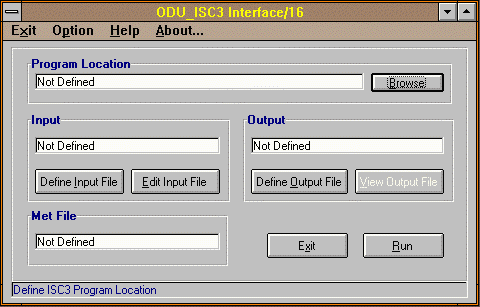 (If you're running ODU_ISC3 interface for
the first time after installation, you will see "Not Defined"
messages for program/input/output boxes) Notice that "View Output
File" button is also disabled since no output file exists now.
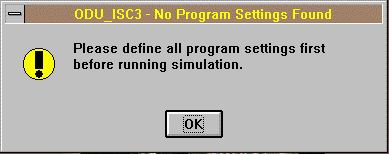
If you move ODU_ISC3 Interface program to a different
directory and run it for the first time, then you'll
see following warning message. Simply redefine
program/input/output parameters. Once defined, they'll
be saved to a ODU_ISC3.INI file for subsequent runs
until changed by you.
(If you're running ODU_ISC3 interface for
the first time after installation, you will see "Not Defined"
messages for program/input/output boxes) Notice that "View Output
File" button is also disabled since no output file exists now.
If you move ODU_ISC3 Interface program to a different
directory and run it for the first time, then you'll
see following warning message. Simply redefine
program/input/output parameters. Once defined, they'll
be saved to a ODU_ISC3.INI file for subsequent runs
until changed by you.
 TOC - ODU_ISC3 Usage

