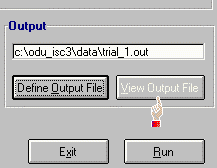
Output file portion in ODU_ISC3 Interface
For each ISC3 simulation, you need to define output filename that simulation
results and air quality estimates will be saved into. By using ODU_ISC3,
you can define output filename to any drive and directory of your choice, and
also you can overwrite the same output file over and over again without
worrying about ISC3's execution requirement of having a brand new output
filename for each simulation.
To assign/define output filename, click Define Output File
button.
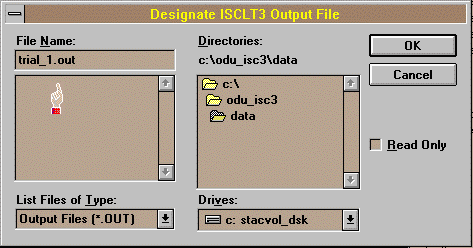
 A familiar File dialog box will appear. Define/assign a filename of your
choice, and it could be anything you want as long as it following DOS filename
convention - maximum 8 character. Usually, output file has an extention of
*.OUT, but you can give any extention you want.
A familiar File dialog box will appear. Define/assign a filename of your
choice, and it could be anything you want as long as it following DOS filename
convention - maximum 8 character. Usually, output file has an extention of
*.OUT, but you can give any extention you want.
 You can change output filename any time by clicking
Define Output File
button from the ODU_ISC3 Interface.
You can change output filename any time by clicking
Define Output File
button from the ODU_ISC3 Interface.
 TOC - ODU_ISC3 Usage

