Model Simulation in ODU_ISC3 Interface
Once which ISC3 model, input datafile and output filename were defined,
you can start Industrial Source Complex (ISC3) Dispersion Air Quality model
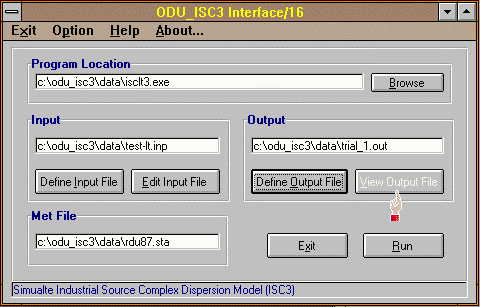
simulation. As shown below, program, input and output are defined, and you're
ready for the simulation. (Notice that "View Output File" button is also disabled
since no output file exists now)
 To start the simulation, click Run
button. A DOS window will apear and the status
of simulation will updated on the window. Once the simulation is completed, the
window will be closed automatically.
To start the simulation, click Run
button. A DOS window will apear and the status
of simulation will updated on the window. Once the simulation is completed, the
window will be closed automatically.
 TOC - ODU_ISC3 Usage

